The Cloud Migration Roadmap of Big Data Business PART II - Migration Works
Preface
In 2023 Q1, I participated in the cloud migration project for big data business in our department, from on-premises to Tencent Cloud. After the migration, we reached the goal of cost reduction and increasing operation & maintenance efficiency.
Some experience and works during this process has been summarized (not confidential things included). The whole content has been split into three techinical notes:
PART I: the big data business overview and on-premises architecture;
PART II (this article): the work and experience learned during cloud migration;
PART III: the key technological transformations and summary.
Cloud Big Data Architecture
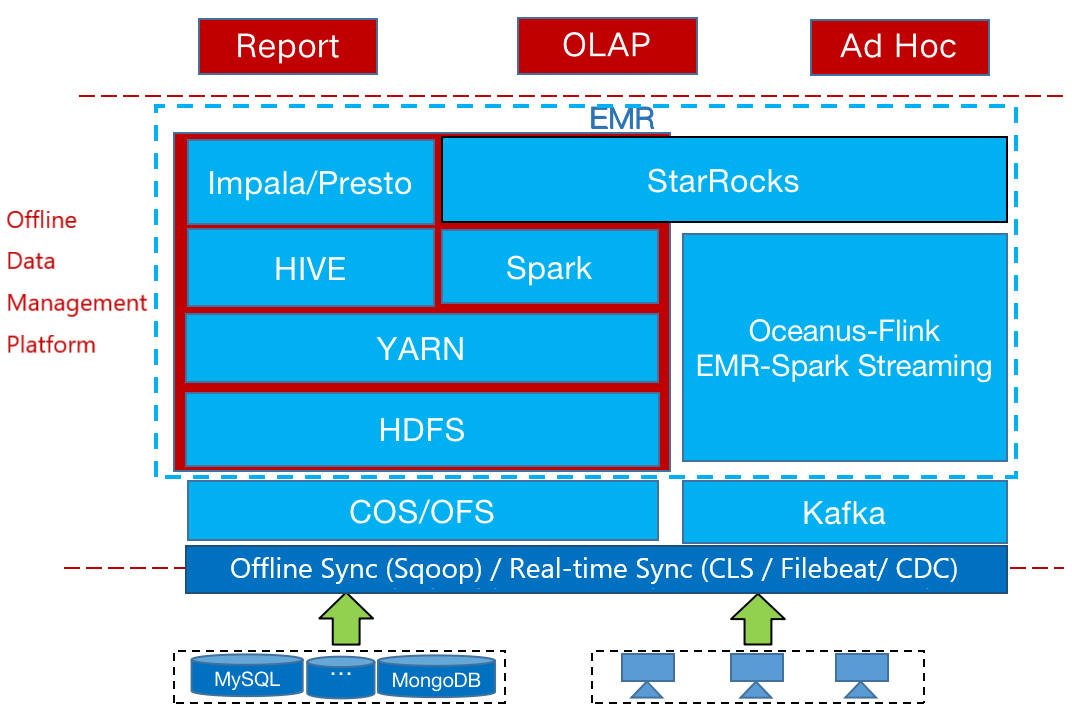
To ensure the rapid migration process of big data business to the cloud, we decided to migrate the big data system to cloud EMR (Elastic MapReduce) in the form of rehosting.
Rehosting: moving an application’s components to the cloud with little or no modification.
EMR not only optimizes open-source components at the kernel level, but also ensures perfect compatibility with open-source components, which avoids business incompatibility problems caused by various component versions, and minimizes the workload, difficulty, risk factors during cloud migration.
The major work of big data migration to cloud EMR is divided into the following aspects:
Infrastructure:
Hadoop under the cloud uses the version of CDH 5.XX, and EMR on the cloud is 2.6. In practice, each component function of the two versions of Hadoop is compatible;
There are independent StarRocks cluster components available on EMR, which can completely replace StarRocks deployed on-premises;
Flink: We use Tencent’s Oceanus. Oceanus provides more powerful task management capabilities and a more stable operating environment based on a faster Flink SQL development method. Because Oceanus is completely containerized, it can achieve more refined resource management than traditional YARN scheduling. In ETL scenarios, even 0.25 CPU can be used to run an operator, which saves computing costs.
Historical data:
Since EMR has the following advantages:
- high-cost performance;
- as a cloud-native data warehouse, it naturally supports the Computation and Storage Separation architecture;
- similar to Redshift Spectrum in AWS, we can directly use object storage as the file system for data storage. Hive, Spark, Impala, Presto and other components can directly operate data on COS/OFS bucket (equivalent to S3 bucket in AWS).
Based on the above advantages, we decided to migrate the historical data in HDFS to the metadata-accelerated object storage service called OFS bucket.
OFS solves the high storage cost challenge for massive historical data, without changing the method of manipulating data, and makes it possible to retain long cycle historical data for analysis or machine learning training tasks.
Business system:
The migration of the BI system is simple.
After data and infrastructure are migrated, the database link information can be configured to the new Impala, Presto, StarRocks clusters. For the offline data management platform, the overall migration workload is large, since thousands of offline data tasks have been accumulated. It is necessary to successfully run through the DAG on the cloud platform.
Migration Tasks
Infrastructure Migration
The migration of the infrastructure includes the following aspects:
Cluster planning and construction:
EMR:
According to the big data business scenario and data processing flow, two sets of EMR clusters are planned:
one cluster used for offline data processing;
another used for real-time data Spark Streaming.
The reason for building two sets of clusters is to consider that the resource usage of offline data processing has obvious characteristics of peaks and valleys, and the resource auto-scaling strategy of EMR can be used. The Spark Streaming tasks are Long-Running tasks, and the resource consumption will be stable. Because EMR can quickly build clusters in minutes, rapid resource isolation at the cluster level is more effective than queue partitioning within the same cluster, and it is also easier for cost sharing.
StarRocks:
For the StarRocks cluster deployed on-premises, only two sets of coarse-grained clusters were built due to machine constraints and maintenance costs.
On the contrary, the cloud native StarRocks cluster construction is no longer limited by resources, and the creation and maintenance costs are much lower. We create multiple fine-grained clusters according to business division, reduced unecessary interference between services.
Flink:
As mentioned before, we directly adopted the streaming computing platform Oceanus provided by the cloud vendor to replace Flink. Based on Flink, Oceanus has done a lot of cumbersome encapsulation work for us, such as providing SQL API, connectors for commonly used data sources. It has also made a lot of enhancements based on the community version kernel and CDC, which is much more convenient than using Flink in a Hadoop cluster alone.
At the same time, Oceanus can also control the task resource usage to the level of 0.25 CU. Compared with the open source Flink where each CPU can only allocate a single slot, Oceanus increases the resource usage of stream computing tasks.
Optimization of EMR offline cluster configuration and deployment mode.
Dynamic auto-scaling policy configuration:
Initially, we use load scaling to perform auto-scaling. However, during load scaling tests, we found that users always do not actively specify the resource usage requirement when submitting tasks, resulting in burrs on resource utilization monitoring.
A subsequent dilemma comes:
If setting a higher monitoring sensitivity for alerting the load threshold, auto-scaling may be triggered repeatedly.
On the contrary, if the monitoring sensitivity is too low, the auto-scaling response may lag.
After discussion with cloud architects, we observed that most of the offline tasks were executed in the early morning, with an obvious time cycle. Therefore, we directly used the scheduled scaling policy, which simply and quickly met the business requirements for time-sharing scheduling resources.
YARN scheduling:
Because the on-premises Hadoop cluster is a large & fixed resource pool, and all users share the cost equally, the adopted scheduling policy is the fair scheduling mode.
Expecting to increase the resource utilization after migration as much as possible, compared with the on-premises IDC whose resident queue contains more than ten thousand cores, what we have achieved on cloud-native EMR is only a few thousand cores. If still using the fair scheduling policy, many tasks can apply for resources from the resource manager at the same time, which results in insufficient resources.
After discussion, we changed the scheduling policy, so that resources can be firstly allocated to the Running tasks that entered the queue in advance, to ensure the tasks complete timely;
Hive configuration:
Based on the on-premises Hive cluster tuning experience and the experience concluded when using EMR, many key parameters have been adjusted. For example, JVM heap memory, MR task memory, log level, session link number etc.,
Impala/Presto:
EMR supports the engine deployment which uses independent task node for Ad Hoc queries, which avoids resource contention caused by mixing with node manager. In large queries or highly concurrent queries scenarios, not only is the master node not pressured, but also the query engine can be scaled independently to fulfill the requirement.
Cluster operation and maintenance:
EMR is a semi-managed PaaS product, which is more flexible and customized than the on-premises Hadoop cluster. Even if the developer does not have rich O&M experience, he / she can still use the automated O&M tool.
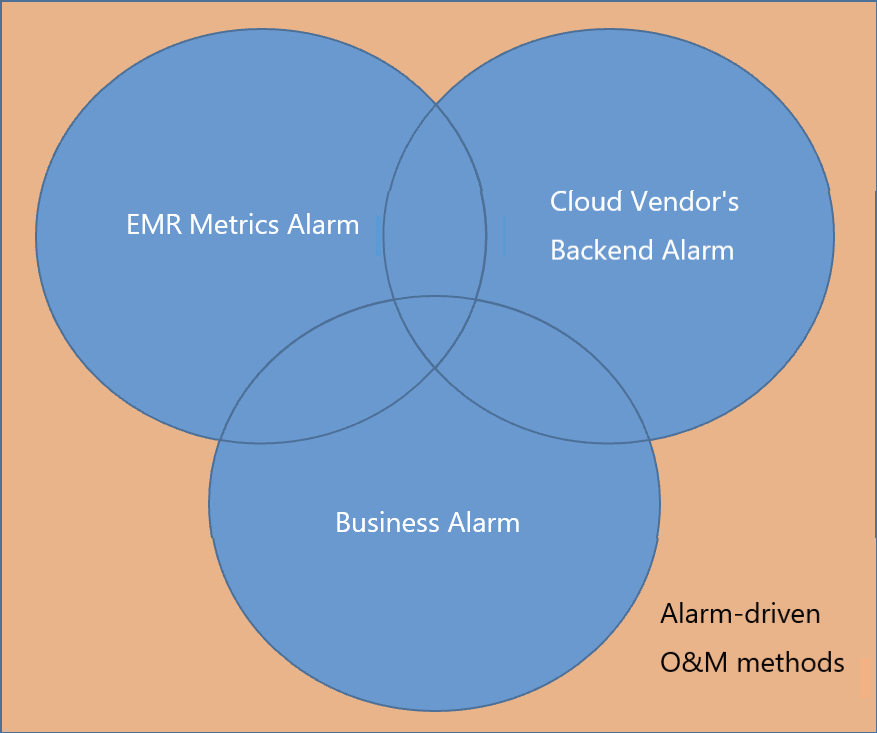
Our next step is to further transform the O&M work to the direction of automation and intelligence. At present, we and the cloud service provider jointly build alarm-driven O&M method, which configures alarm from many aspects, including:
- EMR hardware/software alarm;
- cloud vendor’s backend inspection alarm;
- internal business alarm.
The combination of the above three alarms forms a combination to cover all possible EMR failure scenarios as completely as possible. Through active O&M, the fault is discovered before it happens, which significantly improves the troubleshooting ability and O&M efficiency.
Historical Data Migration
The migration of historical data includes the following aspects:
Data warehouse
To save storage costs, we migrated the historical data of several data warehouses stored in on-premises HDFS cluster to object storage. During the process, we have tackled a series of problems:
Treatment on Kerberos::
The on-premises Hadoop cluster is shared by multiple business departments (i.e., multi-tennant), so Kerberos authentication is enabled. However, access control strategies including NACL, security group, and cluster-level isolation have already been implemented in the cloud, and the users can only submit the tasks through the scheduling system. To facilitate the O&M team, Kerberos is disabled on the cloud-native cluster. Data migration DistCp tasks are initiated from on-premises Hadoop.
Integrity of on-premises cluster::
Since COS-Distcp needs to introduce dependency packages of object storage into the Hadoop cluster, to avoid changes to the on-premises Hadoop production cluster, we use the cloud EMR cluster for data migration.
- we firstly use DistCp to migrate data to the cloud;
- then run the bucket-level DistCp command to synchronize the HDFS data to the object storage;
- after the migration is finished, run the SkipTrash parameter to clear the transit data stored on cloud.
Bandwidth limitation::
Due to the bandwidth limitation from on-premises IDC to the cloud, it is necessary to pay attention to the impact on the bandwidth when copying data. We introduce the Bandwidth and m parameters when running Hadoop DistCp to control the bandwidth of the migration task and the number of Map concurrent tasks.
Data verification::
Since the primary Hadoop DistCp command cannot verify the consistency of HDFS and object storage data, we need to use the bucket-level DistCp tool provided by the cloud vendor for verification after data migration.
Keep file timestamp unchanged:
Run the -pt parameter to migrate the file time attribute in the HDFS to the object storage. Then archive the file based on the timestamp attribute.
Hive metadata migration
Based on the metadata management module of the offline data management platform, we obtain all databases and data tables on-premises, and run the SHOW CREATE TABLE XXX command to get the tables’ DDL. The path of the data table is consistent with the path on-premises. In addition, the offline data management platform on the cloud is used to create data tables in batches.
Raw log migration
When migrating raw log, we studied the users’ data usage scenarios and designed the following life-cycle policy:
data barely used one month ago is stored in deep archives.
data barely used one week ago is moved to low frequency storage tier, which further reduces storage costs with COS’s deep archiving and low frequency capabilities.
StarRocks migration
There are three main ways to migrate data to cloud native StarRocks:
Using EXPORT command to export data from on-premises StarRocks to HDFS, and then import data to cloud StarRocks through Broker Load. This mode is suitable for data migration in large volume & without special data types.
Create the External Table of StarRocks on the cloud, and then import data by conducting INSERT INTO XXX SELECT XXX. This method is suitable for data table migration with HyperLogLog (HLL) and Bitmap fields. However, if it is a large table, the import speed is slow;
Migrating the legacy of Apache Doris system. Because StarRocks and Apache Doris data formats are incompatible, EXPORT cannot be used. We alternatively used MySQL Client to redirect data query results to the local, and then imported the data to StarRocks on the cloud through Stream Load.
Business system migration
Business system mainly refers to the migration of the offline data management platform. 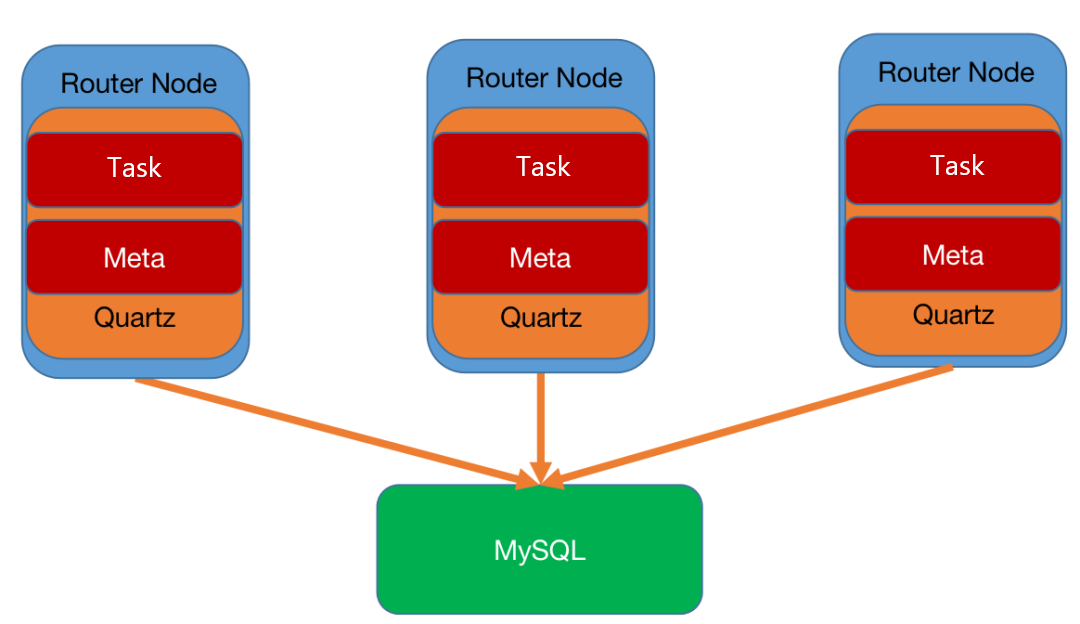
Deployment:
The service process is deployed on the router node. Compared with on-premises environment, node resources are richer, and the router node can be scaled as required.
Synchronization:
Using DTS can easily synchronize the tasks and table metadata information stored in MySQL to the cloud;
Data task migration:
With external support, we used tools to run tests on thousands of data tasks, and verify Hive and Spark SQL statements in data tasks. We verified SQL running on-premises is compatible on the cloud. Only a few SQL statement compatibility problems merged among thousands of data tasks.
Additionally, during the test, we found that the HIVE CLI and Beeline execution of EMR occupy a large amount of CPU at the beginning. Therefore, relevant jars are replaced.
Finally, through testing, dual running and canary deployment, the whole data task DAG is gradually migrated to the cloud.